Sharing
Sharing
Here’s how you can use InkTip’s sharing feature.
First, list a script on the site. Or two. Make sure you upload the script as well.

Now, you are ready to create links to share your listing by clicking that “Share” button. That’s one way.
The other way to share is by sending queries through InkTip.
We provide plenty of opportunities each Thursday in our newsletter. Even better, subscribe to the Preferred Newsletter for 6-8 opportunities each week.
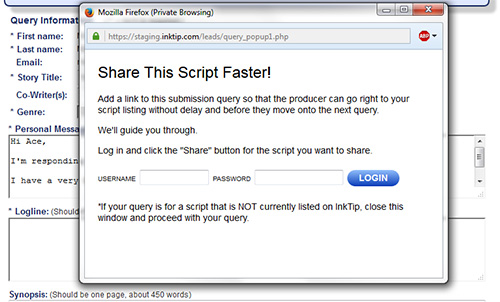
When you submit queries using InkTip’s form, you’ll see a pop-up asking if you’d like to log in and create a link for your pitch. That way, when readers check their InkTip queries, they can click on that link, which will take them to your script listing.
The popup looks like this:
If your popup doesn’t show, then
When a reader clicks on a link from their queries, they’ll see your listing.
Any viewings that originate from you sharing that link will be highlighted in yellow on your viewings page.
Assemble the opportunities (i.e. production companies) of people who can read your script. Check out the newsletter you receive on Thursdays. Even better, sign up for the Preferred Newsletter and you’ll have plenty of opportunities to check out.
Third,
Fourth, use it for your personal network. If you aren’t networking, here’s a time to build that network.
_______ writers sent messages.
_______ links were sent.
This means you are
Contact InkTip